Rubblewebs
THESE CODES ARE PROVIDED FOR AN EXAMPLE OF HOW TO USE IMAGEMAGICK WITH PHP. CARE SHOULD BE TAKEN WHEN ACCEPTING USER INPUT.
I TAKE NO RESPONSABILTY FOR ANY PROBLEMS THAT MAY OCCURE WHEN USING ANY OF THIS CODE.
IT IS UP TO YOU TO SECURE THE CODE AND VALIDATE USER INPUT.
Installation notes - Windows:
When installing let Imagemagick add itself to the Enviromental variables path as it will make your life easier
- Download and run the latest Windows binary release ( .exe file ).
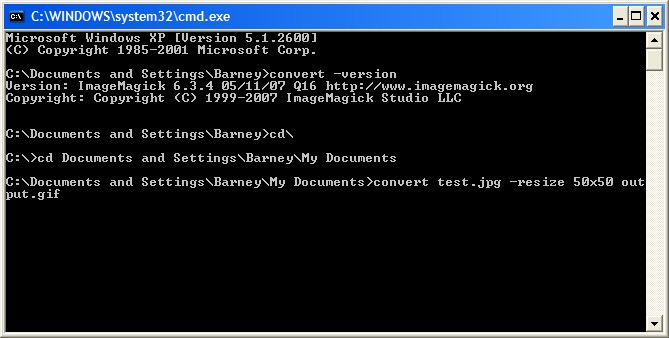
- Prove image magick is running by opening the command prompt ( Start button -> All Programes -> Accessories -> Command Prompt ) and type: convert -version
This should display the version of ImageMagick installed. - To use:
- Open Command prompt ( as step 2 above ).
- Using cd directory name get to the directory with the original image in - in my case I went
cd \ to take me back to the root
Then after the c:\ prompt
cd Documents and Settings\Barney\My Documents - This is where the image I want to modify is located.
( You can look at image properties by right clicking on it to find the path you need. ) - I then ran convert test.jpg -resize 50x50 output.gif
I now have an image called output.gif in the My Documents folder.