
Gravity option
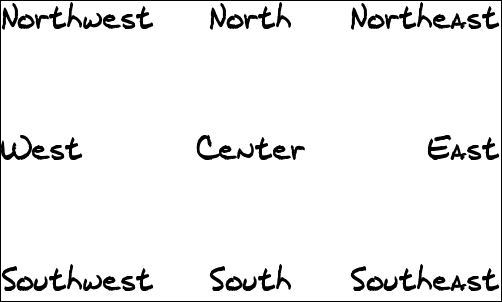
<?php
$cmd = "-size 500x300 xc:white -font ../verdana.ttf -pointsize 30 ".
" -draw \"gravity center fill black text 0,0 \"Center\" \" ".
" -draw \"gravity North fill black text 0,0 \"North\" \" ".
" -draw \"gravity Northeast fill black text 0,0 \"Northeast\" \" ".
" -draw \"gravity East fill black text 0,0 \"East\" \" ".
" -draw \"gravity Southeast fill black text 0,0 \"Southeast\" \" ".
" -draw \"gravity South fill black text 0,0 \"South\" \" ".
" -draw \"gravity Southwest fill black text 0,0 \"Southwest\" \" ".
" -draw \"gravity West fill black text 0,0 \"West\" \" ".
" -draw \"gravity Northwest fill black text 0,0 \"Northwest\" \" ".
" -bordercolor black -border 1x1 " ;
exec("convert $cmd output.png");

// In this case I think a neater way of writting the code is using more php as below.

// Array of values
$arr = array("North", "Northeast", "East", "Southeast", "South", "Southwest", "West", "Northwest", "Center");

// Set $command
$command ="";

// Setup loop for the array
foreach ($arr as $value) {

// Create the individual draw commands and add them to the previous value of $command
$command .= " -draw \"gravity $value fill black text 0,0 $value \" " ;  }

// Create the image using php
exec(" convert -size 500x300 xc:white -font ../verdana.ttf -pointsize 30 $command bordercolor black -border 1x1 output.png" );

exec("convert $cmd output.png");
?>
The -gravity option is used to place the object in position. The object can be moved from the position set by gravity by using the geometry option as well e.g. -gravity Center -geometry +10+10