
Row of images
<?php
// Code modified from a shell script by Anthony Thyssen

/*
Default location for the first image
This can be any number as I correctly handle the formating
of images which may generate given a negative offset.
*/
    $center = "0";

// Distance to the next images center. This can be negative!
    $offset = "100";

// Final image background canvas color
    $background = "LightSteelBlue";

// Setup image names for laying out the images
    $layer_image = "image.miff";
    $layer_map = "layer_map.miff";

// Create an array of all the png images in the folder
    $image_array = glob( "*.png" );

// Find how many images there are in the array and remove 1 as we start at 0 not 1
    $count = count( $image_array );
    $count = $count -1;

// Create an array of colours to use for the map
    $colours = array( 'Red', 'Blue', 'brown', 'Yellow', 'Green' );

// Loop through the array of images
    for ( $i=0; $i<=$count; $i++ )
    {

/*
Remove the .png extension - this will be replaced by a miff extension
Need to do as we need to rename some images to prevent overwritting
*/
    $file = str_replace( '.png', '', $image_array[$i] );

// Create tempory image name formats
    $temp_map = "0.miff";
    $temp_image = "1.miff";

/*
Modify the image - thumbnail, polaroid image to a temp file.
I used super-sampled polariod to make the result better
This could have been done in a previous step to this loop
*/
    $cmd = " -size 500x500 $image_array[$i] -matte -thumbnail 240x240".
        " -set caption %t -bordercolor Lavender -background none".
        " -pointsize 12 -density 96x96 +polaroid -resize 50% -write $temp_image".
        " -channel A -threshold 50% +channel".
        " -fill {$colours[$i]} -colorize 100%  $temp_map";

// Carry out the command
        exec("convert $cmd");

/*
Now get image size, half it, and determine its virtual canvas
location so as to place it's center at the current position.
Could be done using getimagesize(  )
*/
    $xpos = exec("convert $temp_image -format \"%[fx: $center - w/2 ]\" info:");
    $ypos = exec("convert $temp_image -format \"%[fx: - h/2 ]\" info:");

/*
$xpos may be positive, in which case it needs to have a '+' sign
$ypos is always negative ( but check its formating anyway )*/
    if ( $xpos > 0 ) {    $xpos = "+".$xpos;    }
    if ( $ypos > 0 ) {    $ypos = "+".$ypos;    }
    $pos = "$xpos$ypos";

// Create new temporary images  with the position offset -  overwritting the original
exec("convert -page $pos $temp_image $temp_image");
exec("convert -page $pos $temp_map $temp_map");

// Increment position for next image
$center = $center + $offset;

// Build up the images into the final order
exec("convert -background $background $layer_image $temp_image -layers merge $layer_image");
exec("convert -background black $layer_map $temp_map -layers merge $layer_map");
}

// Convert the images from a miff format to a browser readable one
exec("convert $layer_image +repage output.jpg");
exec("convert $layer_map +repage output_map.gif");

// Remove the tempory ima
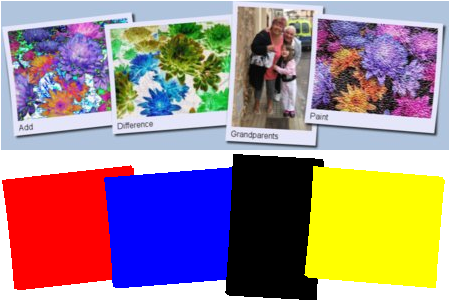
This code is based on a shell script by Anthony Thyssen and creates a row of images and a associted "colour map".
The two images can be used by the php function ImageColorAt( ) to create a type of Imagemap.
The images are resized; have their file name added and modified to look like a poleroid photo.
This needs a later version of Imagemagick as it uses the -layers operator.